Web application firewalls: how a WAF protects modern web apps
What a web application firewall is, where it sits in the stack, which common attacks it stops and how to deploy one.
- security
- waf
- web-security
- backend
- devops

Modern web applications face constant malicious traffic: SQL injection, cross-site scripting, automated bots, and exploit attempts against known vulnerabilities. A Web Application Firewall (WAF) is a security layer that helps stop these threats before they reach your application.
A WAF is software that protects web applications from known attack patterns and cyber threat vectors. It works at the web application layer and inspects HTTP/HTTPS traffic.
A WAF can protect:
- Backend services (REST APIs, GraphQL, microservices)
- Frontend applications
- Monolithic and distributed architectures
A WAF can only inspect HTTP/HTTPS traffic. It is not suitable for:
- SSH connections
- Custom TCP/UDP protocols
- Database-native or internal service traffic
Using a WAF for non-HTTP traffic provides no real protection.
Where does a WAF sit in the system stack?
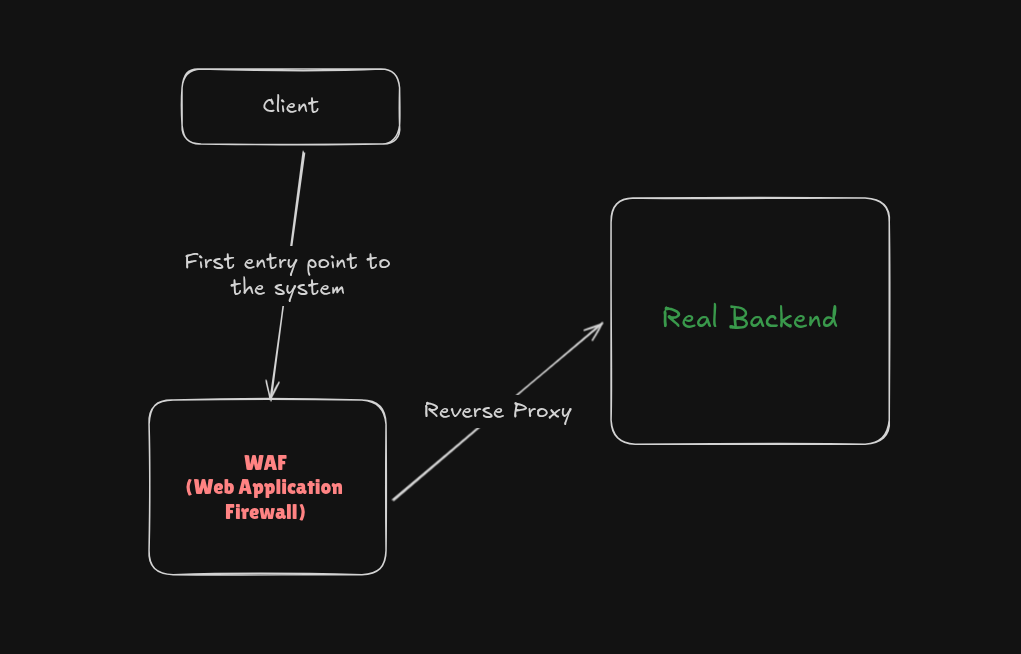
A WAF is almost always the first entry point into your system.
In a typical architecture:
- The client sends a request
- The request hits the WAF
- The WAF acts as a reverse proxy
- Allowed traffic is forwarded to the backend services
Because the WAF sits at the edge, it filters malicious traffic early, which reduces load and risk on downstream systems.
What does a WAF need to do?
For a WAF to be effective, it has to handle several responsibilities:
-
TLS decryption: modern traffic is encrypted, so the WAF must terminate TLS to inspect requests.
-
Request inspection: analyze headers, query parameters, request bodies, and cookies for:
- SQL injection
- Cross-site scripting (XSS)
- Known framework or runtime vulnerabilities
- Exploit payloads targeting server-side rendering or evaluation flaws
-
Traffic blocking: if a request matches a known malicious pattern, block it immediately.
-
Traffic allowance: legitimate traffic should pass through without unnecessary friction.
-
Rate limiting: protect against brute-force attacks, bot abuse, and denial-of-service attempts.
-
High performance: a WAF sits directly in the request path, so if it is slow, your entire application becomes slow. A production-grade WAF must have low latency, be highly optimized, and handle high throughput.
Common web attacks and how a WAF helps
A WAF mainly protects against known, pattern-based web attacks. Common examples:
SQL injection (SQLi)
username=admin' OR '1'='1Attackers inject malicious SQL through user input fields. A WAF detects SQL patterns and blocks malicious queries before they reach the database.
Cross-site scripting (XSS)
<script>
  alert("XSS");
</script>
Attackers inject malicious JavaScript into inputs, and it runs in the victim's browser. A WAF blocks script-based payloads and encoded JavaScript patterns.
Remote code execution (RCE)
${{7*7}}Attackers exploit known framework or runtime vulnerabilities. A WAF blocks known exploit signatures and malicious expressions.
Path traversal
../../../../etc/passwdAttackers manipulate file paths to reach restricted files. A WAF detects traversal patterns and blocks the unauthorized access.
Brute force and bot attacks
POST /login (repeated thousands of times)Automated requests are used to guess credentials or abuse APIs. A WAF applies rate limits and blocks abnormal traffic patterns.
Why is a WAF important?
A WAF is not a silver bullet and does not provide 100% protection. It does:
- Reduce the attack surface
- Stop automated and low-effort attacks
- Buy time during active incidents
- Save engineering effort and operational cost
In practice it works as a first line of defense, which lets teams spend their time on deeper security work.
Ways to deploy a WAF
Cloud-managed (edge) WAF
A WAF operated by a third-party provider and deployed at the network edge, before traffic reaches your infrastructure. Examples are AWS WAF and Cloudflare WAF.
Pros:
- Quick setup with minimal maintenance
- Automatic scaling
- Effective against bots and common web attacks
Cons:
- Limited fine-grained control
- Vendor lock-in
- Costs scale with traffic
Self-hosted (reverse proxy) WAF
A WAF deployed within your own infrastructure, typically running as a reverse proxy in front of the application.
Pros:
- Full control over rules and behavior
- Deep customization
- Better suited for strict compliance needs
Cons:
- Operational overhead
- Requires security expertise
Self-hosted WAFs fit when control and customization matter more than operational simplicity.
One real-world deployment example
In production, a common setup looks like this:
Cloudflare WAF → Load Balancer → Application → Database
Here the WAF filters malicious traffic at the edge, the load balancer distributes clean requests, the application handles business logic, and the database stays isolated from direct internet exposure.
Final thoughts
A WAF should never replace secure coding, proper authentication, or regular patching. Deployed correctly, it greatly improves your security posture by stopping common attacks before they reach your application.